How to Choose Gym Management Software: A Buyer's Guide
How to choose gym management software for one small gym: five tests, what to ask a vendor, how switching from a register works, and a checklist.
 GymPilot Team
Looking for the product itself? See gym management software in India — built for Indian gyms, with WhatsApp reminders and UPI tracking.
In this guide
The short answer
In short: To choose gym management software for one small gym, pick one your slowest staff member can use in a day, that logs UPI, cash and part payments, and lets you export your data.
Most owners buying for the first time compare feature lists. That is the wrong end to start from. Start from the job you do badly today, and pick the software that does that one job well.
If you are already weighing the money side, our pricing page states the trial length, the refund window and the billing model in plain words. Use it as the yardstick: any vendor you talk to should be able to answer those three things just as plainly.
Everything else in this guide is about how to test that, without a technical bone in your body.
Start with the job, not the feature list
Think about the last time you lost an hour in your gym. Not on the floor. At the desk.
Somebody says they paid last month. You flip through the register. The page is torn, or the handwriting is a trainer's, or the entry is in the Excel file on a laptop that is at home. Then you open WhatsApp and type "bhai payment dedo" to the next member on the list, one at a time.
That hour is the job. Software is only worth paying for if it takes that hour away.
So before you look at a single website, write down your three worst hours. For a lot of single-gym owners they look like this:
- Finding out who has paid, who owes, and how much.
- Knowing who expires this week, and telling them before they lapse.
- Trusting that cash taken at the desk got written down.
Notice that none of these is "a dashboard with charts" or "a mobile app for members". Those may be nice later. If your three worst hours are different, use yours. The rest of this guide works the same way.
A quick note if you are thinking of a franchise: some brands hand you their own system and expect you to use it. Ask before you buy anything. Our franchise guide lists that question among the ones to put to a franchisor in writing.
What you are probably using now, and where it breaks
Nobody starts with software. You start with a register, then Excel, then a WhatsApp group. Each one works until a certain size and then stops working in a very particular way.
Where each way of tracking members gives out
| What you use | It works while | It breaks when |
|---|---|---|
| Paper register | You know every member by face | A page is torn, or two people write in it differently |
| Excel sheet | One person updates it, on one laptop | Someone forgets to enter a payment, or the file has two copies |
| WhatsApp group | You have 20 members and you remember who owes | You have 200 and you are typing reminders by hand |
| Someone's memory | You are at the desk every day | You take a day off |
Look at that table and find your row. That is what the software has to replace. If you want the long version of the comparison, we have written it out for Excel, Tally, WhatsApp groups and free software on the site.
Now, what should the new thing do?

Five tests for how to choose gym management software
You do not need a spreadsheet of features. Run five tests. If a product fails one, drop it, however good the website looks.
1. Can the slowest person at your desk use it in a day?
Not you. You will work it out. The person who covers the desk when you are away, and who is not comfortable with computers.
The buyer guides that vendors themselves publish agree on this. One says a short learning curve "reduces onboarding time and limits errors during member check-in and billing", and that new owners are "more dependent on support because they are learning the platform while running the business simultaneously" (see this buyer guide). You are exactly that owner. So test it like one.
During the trial, hand your desk person the phone or laptop and say only: "Add this new member, take ₹500 in cash, and tell me who expires this week." Do not help. If they get stuck, so will you on a busy morning with a queue at the desk.
2. Does it record how your members actually pay?
Indian gyms are not card-swipe businesses. Members pay by UPI, cash, sometimes part now and part later. Software built for another country's habits often handles one of these well and the others badly.
Ask to see all three logged into the same place. UPI paid to your own number. Cash handed over at the desk. Half now, half next week. Each should end up in one list per member, so you can open a name and see what was paid and what is due.
If payments live partly in the software and partly in your bank statement, you have moved the reconciling job, not removed it. Our page on gym billing software shows what one ledger for UPI, cash and partial payments looks like.
One more line on this. Do not assume any product does your tax or GST paperwork. Ask, and get the answer in writing. If it does not, that is fine, but you should know, and your accountant should still do that job.
3. Will it remind members so you do not have to?
This is the test that pays for the software. Reminders that go out on their own, before the plan expires and when dues are pending, are what stop you typing the same message again and again every week.
Two questions. Which channel do the reminders use? In India that should be WhatsApp, because that is where your members already are. And do they go automatically once a plan is assigned, or do you press a button every time?
An automatic reminder needs one thing from you: an expiry date that is right. So the software should work out the date from the plan you gave the member, rather than have you type it. Our membership management page explains how that works.
4. Can you see who did what?
This one is about trust, not convenience. When a staff member takes cash, does the entry carry their name? Can a trainer see member names but not the money?
Ask about staff logins. Ask whether a staff member can delete a payment, and if so, whether that leaves a trace. You are not accusing anyone. You are building a system where nobody has to be trusted on memory alone, which is fairer to your honest staff too.
5. Can you leave?
This is the test nobody wants to think about on day one, and it is the one that matters most once you have years of records inside.
Can you download your member list, your payment history and your expiry dates? In a format you can open in Excel? What does the vendor do with your data if you cancel?
The Digital Personal Data Protection Act, 2023 puts duties on whoever decides why and how members' details are used. Section 8 says such a party must take "reasonable security safeguards to prevent personal data breach" and must erase data once its purpose is over. It also says a processor can be engaged only "under a valid contract". In your gym's case you hold your members' names and phone numbers, and the software company handles them for you. I am not a lawyer, and I have not read the rules that came after the Act, so ask your own adviser how it applies to you. The plain point for a buyer: pick a vendor who talks about your data without you having to drag it out of them.

What to ask a vendor before you pay
Here are the questions, in the order we would ask them. Put them in an email so you have the answers in writing. A vendor who replies clearly is telling you how support will feel later.
Questions to ask, what a good answer sounds like, and what should worry you
| Ask | A good answer | A warning sign |
|---|---|---|
| Is there a free trial, and do I need a card? | Yes, with the length stated and no card needed | "Book a demo first" and nothing to try yourself |
| How is billing done? Are there setup fees? | One clear price, fees listed | Setup, training and support charged separately, found later |
| What is the contract length and the cancellation rule? | Month to month, or a stated refund window | A long lock-in, with penalties for leaving |
| Who helps me move my member list? | Named help, or a written guide | "You upload it yourself" with nothing to help |
| Who do I call when a payment does not show? | A phone number or WhatsApp line, and a reply time | A ticket form only |
| Can I export all my data? | Yes, in a file I can open | "Ask support" or no clear answer |
| Do I need to download anything? Does it need internet? | A direct, honest answer either way | A vague yes to both |
| How many members does my price cover? | A stated limit, and what happens above it | A price that jumps without warning |
Source: buyer guides from one software company and another, adapted for an Indian single-gym owner.
A few of these are worth saying more about.
Hidden fees. One vendor guide tells buyers to "ask about setup fees, charges for premium support tiers, or extra costs for 'add-on' modules like advanced access control that you consider basic features." Good advice. Ask for the total for your gym, for a full year, with everything you need switched on. Compare that number, not the headline one.
Contract length. The same guide says to understand the difference between flexible month-to-month plans and long-term contracts, "including any cancellation penalties." For a gym that has never used software, a long contract is a bet that you will like it. Do not make that bet before you have tried it.
Trial and refund. A trial that needs no card is the honest kind. And a refund window in writing tells you the vendor expects to be judged on the product. Ask both.
Support in your language, in your hours. Your busiest hours are early morning and evening. A support desk that only answers mid-morning, in a language you do not think in, is not much help. Ask when they answer, and how.
Do I need to download an app? Some products are apps from a store. Some run in the browser on any phone. Neither is wrong, but you should know which you are getting, because it changes how your staff log in and how updates reach them. Ask too whether it needs the internet to work. Most cloud software does, so plan for a slow day on your router.
How long switching from a register or spreadsheet takes
This is the fear behind most owners' hesitation. "I have years of names in a register. Will I lose them? Will it take a month?"
We will be straight: nobody can give you an honest number of days without knowing how many members you have and how tidy your records are. We could not find a trustworthy figure published anywhere, so we will not make one up. What I can tell you is where the time goes. It is not in the software. On GymPilot, for instance, creating the account takes about 2 minutes. The time goes into your data.
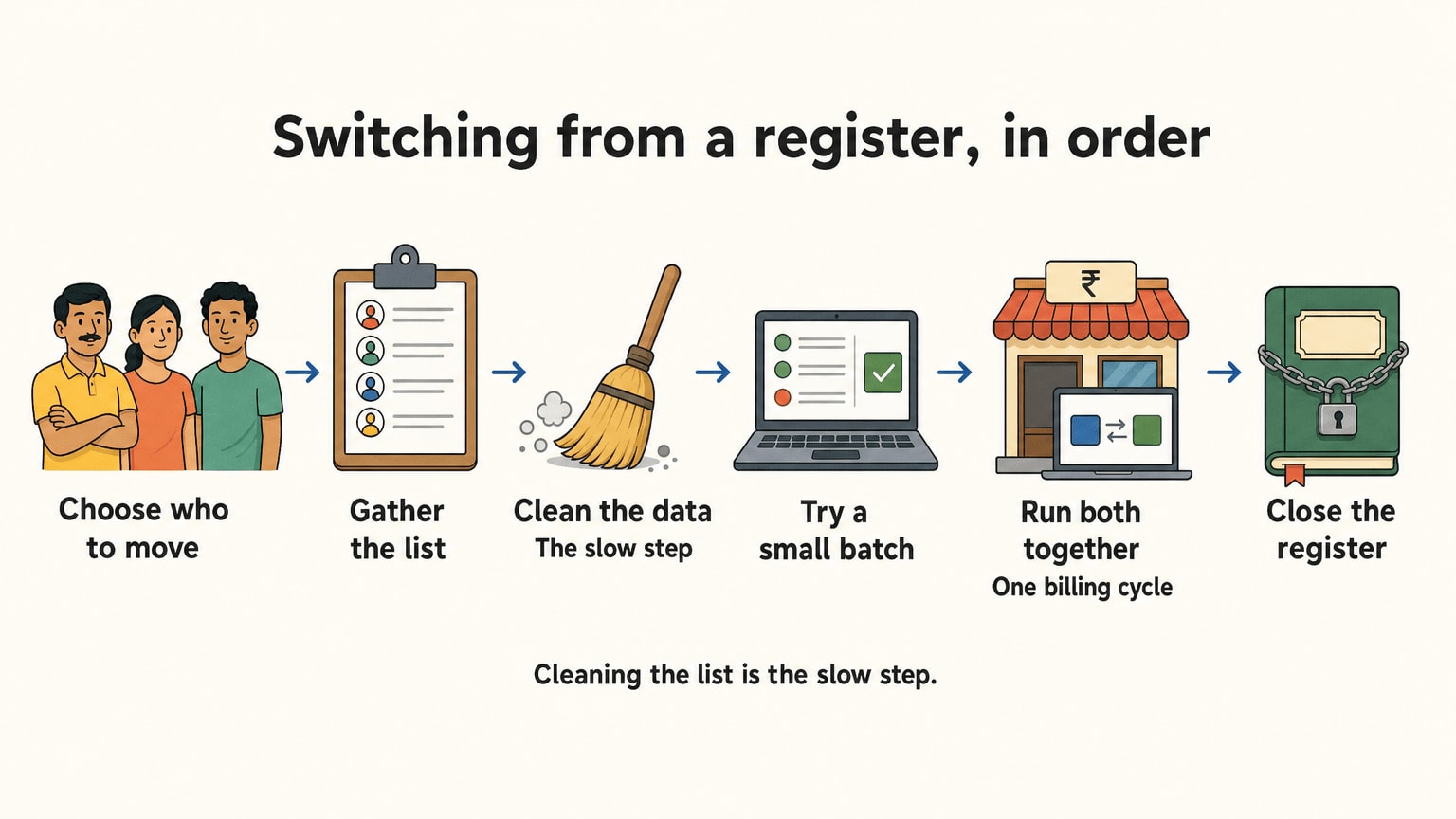
Here are the steps, in order, with what each one really costs you.
Step one: decide what you are moving. You do not need every member since the day you opened. You need the ones who are active or who might renew. Members who left years ago can stay in the register, in a drawer, labelled. This alone can shrink the job a lot.
Step two: get the list into one place. If it is a register, this means typing. If it is Excel, it means tidying. For each member you want a name, a phone number that works on WhatsApp, the plan, the start date, the end date and any amount due. Nothing else is needed on day one.
Step three: clean it. This is the slow part. Phone numbers with a missing digit. The same member typed two ways. A plan with no end date. Fix them now, because a reminder sent to a wrong number goes nowhere, and you will not know.
Step four: put in a small batch first. Add 10 members by hand, or upload 10 rows if the software allows it. Look at each profile. Are the dates right? Are dues showing? Then do the rest.
Step five: run both for one billing cycle. Keep the register going alongside for that cycle. It feels like double work, and it is, but it is your safety net. When a member says "I paid last month", you can check both.
Step six: stop writing in the register. On a date you choose, tell your staff the register is closed. Put it in a drawer. Do not throw it away for a year.
The six steps, and what usually eats the time
| Step | What it is | Where the time goes |
|---|---|---|
| 1 | Choose who to move | A short decision, but people skip it |
| 2 | Gather the list | Typing, if from a register |
| 3 | Clean the data | Wrong numbers, duplicates, missing dates |
| 4 | Try 10 members first | A short check, worth doing |
| 5 | Run both together | One billing cycle of double entry |
| 6 | Close the register | A staff briefing |
If you have 100 members, most of your effort is in steps two and three. If you have 300, expect them to take proportionally longer, and ask the vendor what help they give with an upload. Some will take your Excel file and load it for you. Some will not. That is a real difference between products, and it is why the migration question sits on the list above.
One more thing about time. Pick a quiet week. Not the first week of January when everyone is joining. Not the week before Diwali when half your members are away. A dull week in the middle of the year is perfect.
Also tell your members before you start, in one WhatsApp message, that reminders are about to start coming from a new number. A member who did not expect it may ignore it, or think it is spam. One line up front fixes that.
Red flags
You will meet some of these. None is a crime. All of them are worth a second look.
- The price is hidden. "Contact us for a quote" for a single gym is a sign the price depends on how much you look like you can pay.
- No trial you can try alone. If every path starts with a sales call, you are being sold, not shown.
- A demo on their data, never yours. Ask to see it with five of your own members typed in.
- Features you did not ask for, at the top of the page. A long list of modules for things a small gym does not do means you may pay for a system built for a much larger business.
- Your data is hard to get back. Covered above. It is the one I would walk away over.
- Promises about money. "You will earn back the cost in a month" is a guess dressed as a guarantee. Software helps you notice dues and renewals sooner. What that is worth depends on your gym. Nobody can promise it for you, and we will not.
- A long contract before you have used it.
Now, what about the hardware? Some owners ask about turnstiles and fingerprint machines at this stage. That is a separate purchase with a separate vendor, and it is worth deciding on its own later. For a small gym, start with the member list and the dues. Get that right first.
A checklist you can print
Copy this to a page and take it to each vendor. Tick as you go.
Before the call
- I have written down my three worst hours at the desk.
- I know how many active members I have today.
- I know which of my members pay by UPI, cash or in parts.
- I have checked whether my franchisor already supplies a system (if I have one).
On the trial
- My desk person added a member and took cash without my help.
- I logged a UPI payment, a cash payment and a part payment.
- I saw the reminder go out, or saw it scheduled, with my own number as the test.
- Expiry dates were worked out for me, not typed by me.
- Staff have their own logins, and payments carry a name.
Before paying
- The total price for a year, with everything I need, is in writing.
- I know the contract length and the cancellation rule.
- I know the refund window.
- I have seen how to export my data.
- I know who to call, on what number, and when they pick up.
- I know whether it needs internet, and whether I download anything.
Switching
- I have chosen which members to move.
- My list has working WhatsApp numbers.
- I tried 10 members first.
- I will run the register alongside for one billing cycle.
- I told my members a new number will message them.

Try it on your own members first
Everything above has one point: do not choose from a website. Choose from your own members, typed in, on a trial.
GymPilot is built for exactly this small-gym case, and you can try it without a card. There is a 30-day free trial with no credit card, and a 7-day refund window if there is a platform issue. It runs in the browser, so there is nothing to download from a store, and it needs an internet connection to sync. Set it against the checklist like any other. If it fails a test, drop it. If you would like to see how it handles your own list, start at thegympilot.com.
Frequently asked questions
What is the most important thing when choosing gym management software?
Whether your slowest staff member can use it without your help. A tool with every feature that nobody at the desk uses will leave you back in the register before long. Test it with the person who covers you, not with yourself.
How much should gym management software cost for a small gym?
It depends on the vendor and on how many members you have, and I have not checked other vendors' prices, so I will not quote a range. Ask for the total for one year with everything you need switched on, and compare that between vendors. Watch for setup fees and paid support tiers.
Do I need software if I only have 100 members?
You may not need it on day one, but a register and a WhatsApp group start to cost you hours well before you reach 300 members. If you are already typing "bhai payment dedo" to people one at a time, or you have lost track of who owes what, that is your sign.
Can I keep my old register when I switch?
Yes, and you should. Run it alongside the new system for one billing cycle and keep it in a drawer afterwards. It is your check when a member disputes a payment.
Does gym software work without internet?
Most cloud software needs a connection. GymPilot's own site says it requires an internet connection to sync data. Whichever you pick, ask the vendor directly and get the answer in writing.
Should I sign a long contract to get a lower price?
Not before you have used it. A trial and a refund window exist so you can find out whether it fits. Get the cancellation rule in writing before you pay.